PC 용 CleanMyDrive 2
- 카테고리: Utilities
- 최근 업데이트: 2022-11-14
- 현재 버전: 2.2.3
- 파일 크기: 7.44 MB
- 개발자: MacPaw Inc.
- 호환성: 필요 Windows XP, Windows Vista, Windows 7, Windows 8, Windows 8.1 and Windows 10, Windows 11



PC에서 CleanMyDrive 2 용 호환 APK 다운로드
| 다운로드 | 개발자 | 평점 | 점수 | 현재 버전 | 성인 랭킹 |
|---|---|---|---|---|---|
| ↓ PC용 APK 다운로드 | MacPaw Inc. | 0 | 0 | 2.2.3 | 4+ |
에뮬레이터의 중요성은 컴퓨터에서 안드로이드 환경을 흉내 내고 안드로이드 폰을 구입하지 않고도 안드로이드 앱을 설치하고 실행하는 것을 매우 쉽게 만들어주는 것입니다. 누가 당신이 두 세계를 즐길 수 없다고 말합니까? 우선 아래에있는 에뮬레이터 앱을 다운로드 할 수 있습니다.
A. Nox App . OR
B. Bluestacks App .
Bluestacks는 매우 대중적이므로 개인적으로 "B"옵션을 사용하는 것이 좋습니다. 문제가 발생하면 Google 또는 Naver.com에서 좋은 해결책을 찾을 수 있습니다.
Bluestacks.exe 또는 Nox.exe를 성공적으로 다운로드 한 경우 컴퓨터의 다운로드 폴더 또는 다운로드 한 파일을 일반적으로 저장하는 곳으로 이동하십시오.
찾으면 클릭하여 응용 프로그램을 설치하십시오. PC에서 설치 프로세스를 시작해야합니다.
다음을 클릭하여 EULA 라이센스 계약에 동의하십시오.
응용 프로그램을 설치하려면 화면 지시문을 따르십시오.
위 사항을 올바르게 수행하면 소프트웨어가 성공적으로 설치됩니다.
이제 설치 한 에뮬레이터 애플리케이션을 열고 검색 창을 찾으십시오. 지금 입력하십시오. - CleanMyDrive 2 앱을 쉽게 볼 수 있습니다. 그것을 클릭하십시오. 응용 프로그램 창이 열리고 에뮬레이터 소프트웨어에 응용 프로그램이 표시됩니다. 설치 버튼을 누르면 응용 프로그램이 다운로드되기 시작합니다. 이제 우리는 모두 끝났습니다.
그런 다음 "모든 앱"아이콘이 표시됩니다.
클릭하면 설치된 모든 응용 프로그램이 포함 된 페이지로 이동합니다.
당신은 CleanMyDrive 2 상. 그것을 클릭하고 응용 프로그램 사용을 시작하십시오.
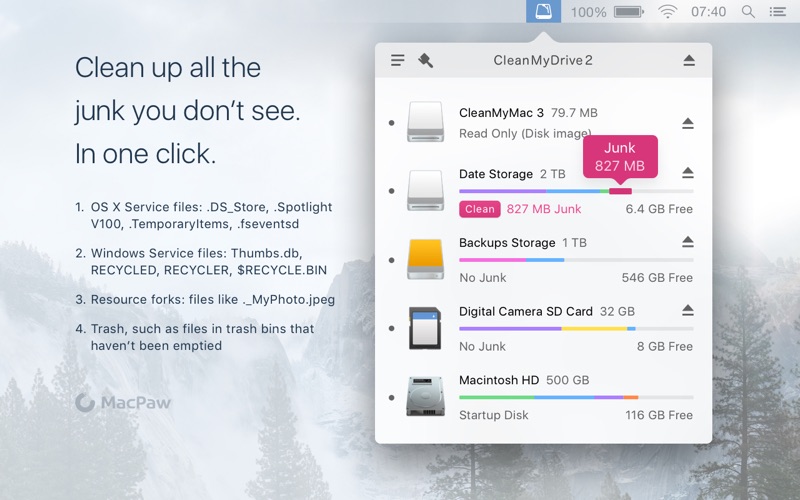
CleanMyDrive 2 is a lightweight disk manager for external and internal drives. It provides quick access to any drive with detailed information on space usage, and cleans hidden junk from external disks. It’s lightning fast and easy to use, with a convenient interface that opens right from the OS X menu bar. CleanMyDrive 2 is the new, improved version of CleanMyDrive, with a beautiful makeover and a whole set of new features. “...A cute little companion to ease up your workflow.” – MacStories "...A nifty utility for people who want an easier way to manage drives." – MacWorld "...Just let it run in the background and keep your drives from accumulating junk." – LifeHacker “I can’t see any reason for you to not install it.” – AppShopper “The app is super simplistic.” – Cult of Mac “It makes storage-related chores a breeze.” – Softpedia With CleanMyDrive 2, you’ll be able to: Prevent issues with external drives after using them on other operating systems. Keep your external drives safe, even when you close your MacBook and unplug them without ejecting in advance. Easily manage storage by knowing the types of files on your drives and how much space they take up. Quickly copy files to any drive by dragging them right into the app. Save time by ejecting all drives with one click or using a global shortcut. Choose a hand-crafted icon for each drive to make it look amazing. What kind of junk does CleanMyDrive 2 get rid of? 1. OS X Service files: .DS_Store, .Spotlight-V100, .TemporaryItems, .fseventsd 2. Windows Service files: Thumbs.db, RECYCLED, RECYCLER, $RECYCLE.BIN 3. Resource forks: files like ._MyPhoto.jpeg 4. Trash, such as files in trash bins that haven’t been emptied. Why should these files be removed? Service files created by OS X and Windows could corrupt your external drive’s compatibility with other devices. For instance, your camera slows down if the SD card has hidden system files. And, they spoil your experience by cluttering the main folder of your disks. You see resource forks when you’ve stored files on your USB stick and want to use them on other devices, such as your TV or car audio system. These devices can’t actually read them, but display them in the folder all the same. You have to scroll through them before you get to the files you actually need. Finally, trash from the bins simply takes space on your drives. And who doesn’t need a little extra disk space?