PC 용 Learn Lightroom 3 Quickstart edition
- 카테고리: Photo & Video
- 최근 업데이트: 2012-07-19
- 현재 버전: 1.1
- 파일 크기: 398.08 MB
- 개발자: Serge Ramelli
- 호환성: 필요 Windows XP, Windows Vista, Windows 7, Windows 8, Windows 8.1 and Windows 10, Windows 11


PC에서 Learn Lightroom 3 Quickstart edition 용 호환 APK 다운로드
| 다운로드 | 개발자 | 평점 | 점수 | 현재 버전 | 성인 랭킹 |
|---|---|---|---|---|---|
| ↓ PC용 APK 다운로드 | Serge Ramelli | 0 | 1.1 | 4+ |
호환되는 PC 앱 또는 대안 확인
| 소프트웨어 | 다운로드 | 평점 | 개발자 |
|---|---|---|---|
| Learn Lightroom 3 Quickstart edition |
PC 앱 받기 | /5 0 리뷰 |
Serge Ramelli |
에뮬레이터의 중요성은 컴퓨터에서 안드로이드 환경을 흉내 내고 안드로이드 폰을 구입하지 않고도 안드로이드 앱을 설치하고 실행하는 것을 매우 쉽게 만들어주는 것입니다. 누가 당신이 두 세계를 즐길 수 없다고 말합니까? 우선 아래에있는 에뮬레이터 앱을 다운로드 할 수 있습니다.
A. Nox App . OR
B. Bluestacks App .
Bluestacks는 매우 대중적이므로 개인적으로 "B"옵션을 사용하는 것이 좋습니다. 문제가 발생하면 Google 또는 Naver.com에서 좋은 해결책을 찾을 수 있습니다.
Bluestacks.exe 또는 Nox.exe를 성공적으로 다운로드 한 경우 컴퓨터의 다운로드 폴더 또는 다운로드 한 파일을 일반적으로 저장하는 곳으로 이동하십시오.
찾으면 클릭하여 응용 프로그램을 설치하십시오. PC에서 설치 프로세스를 시작해야합니다.
다음을 클릭하여 EULA 라이센스 계약에 동의하십시오.
응용 프로그램을 설치하려면 화면 지시문을 따르십시오.
위 사항을 올바르게 수행하면 소프트웨어가 성공적으로 설치됩니다.
이제 설치 한 에뮬레이터 애플리케이션을 열고 검색 창을 찾으십시오. 지금 입력하십시오. - Learn Lightroom 3 Quickstart edition 앱을 쉽게 볼 수 있습니다. 그것을 클릭하십시오. 응용 프로그램 창이 열리고 에뮬레이터 소프트웨어에 응용 프로그램이 표시됩니다. 설치 버튼을 누르면 응용 프로그램이 다운로드되기 시작합니다. 이제 우리는 모두 끝났습니다.
그런 다음 "모든 앱"아이콘이 표시됩니다.
클릭하면 설치된 모든 응용 프로그램이 포함 된 페이지로 이동합니다.
당신은 Learn Lightroom 3 Quickstart edition 상. 그것을 클릭하고 응용 프로그램 사용을 시작하십시오.
Mac OS 에서 Learn Lightroom 3 Quickstart edition 다운로드
| 다운로드 | 개발자 | 점수 | 현재 버전 | 성인 랭킹 |
|---|---|---|---|---|
| ₩7,500 - Mac 에서 다운로드 | Serge Ramelli | 1.1 | 4+ |
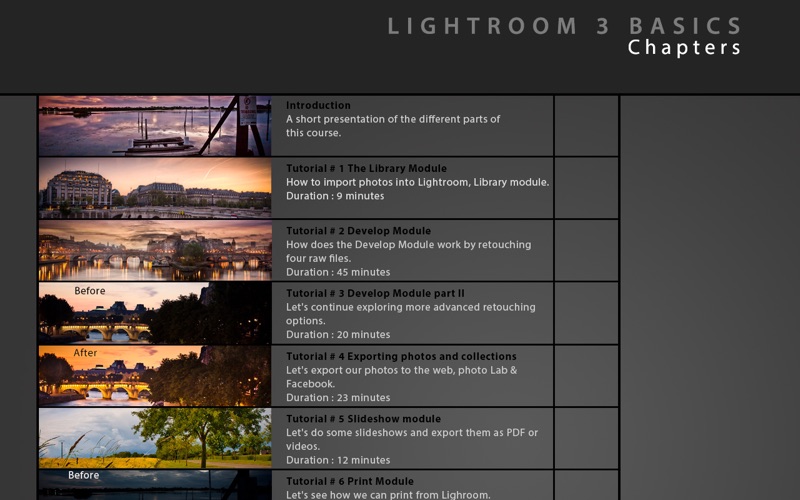
CREATE STUNNING PHOTOS AND MANAGE THEM LIGHTROOM 3 Learn how to import, retouch, GPS tag, create a book, print, create slideshows, create web galleries and print with all the module of Lightroom 3. No technical jargon used without a simple explanation. More importantly get straight to work retouching your photos. Start making your pictures awesome today. In these 7 videos (in English) for a total of 2 hours and 15 minutes you will master a very simple work-flow, where you can import, retouch, export, print, create slide-shows and online galleries. FREE with the app: Access to amazing high-res pictures of Paris (raw files), so you can follow along the retouching steps and get the same results ! - Are you tired of all the theory and technical jargon you have to wade through before getting to the point? - Do you want to master the industry-leading digital darkroom in no time ? - Do you want tutorials that are easy to understand and fun ? This tutorial is probably what you are looking for. Serge Ramelli is a renowned French photographer and one of the best selling teachers of Lightroom in France. Now get his tutorials with this simple app in English. Serge is a known for his very unique way of teaching, with 2 main rules : 1. No technical terms explained with technical words, but with simple english. 2. No theory, practical and visual examples only. Some comments: I could put Lightroom to use immediately... ***** “What I like in these Lightroom tutorials is the practical approach from a real photographer’s viewpoint. I’ve discovered useful functions of Lightroom so I could put the software to use immediately. A great training for any amateur photographer that wants to learn how to use Lightroom 3.” I’ve got two masters in post-production Scott Kelby and Serge Ramelli... ***** “Clear and well explained tutorials.” Anyone can learn... ***** “Very nice approach to Lightroom. Many well explained situations. One tends to start using them right away. Training that anyone can learn.” Even though I’m a graphic designer... “I’ve been following Serge’s tutorials for a year. Everyone is great, even though I’m a graphic designer I recommend them to everyone. Summary of the videos: Chapter one : Importing photos Simple and fast explanations on how to import your photos into Lightroom. Chapter two : Retouching part 1 Without going into any theory we jump right into retouching 4 photos, and this way we explore all the main functions of Lightroom. Chapter Three : Retouching Part 2 In this chapter we see how to go back and forth and back forth between Lightroom and Photoshop. There are times when Lightroom retouching will not be enough, lets take a few minutes into Photoshop do some magic then back to Lightroom. Chapter Four : Exporting photos and collections Let's see how to take our photos out of Lightroom, to email, publish to Facebook or export them for large prints. We also go into collections, a unique way to file your best photos in an easy system to use. Chapter Five : Slide show Module Now that we have retouched our photos, let's create great slideshows and export them as a video or PDF file. Chapter Six : Print Module How to do we get the best prints from Lightroom. Chapter 7 : You will learn how to make breathtaking galleries to send to your clients and friends in less then 30 seconds !