PC 용 Teleprompter — Video & Mirror
- 카테고리: Photo & Video
- 최근 업데이트: 2026-06-12
- 현재 버전: 2.1.5
- 파일 크기: 19.82 MB
- 개발자: MSDC TECHNOLOGIES LTD
- 호환성: 필요 Windows XP, Windows Vista, Windows 7, Windows 8, Windows 8.1 and Windows 10, Windows 11



PC에서 Teleprompter — Video & Mirror 용 호환 APK 다운로드
| 다운로드 | 개발자 | 평점 | 점수 | 현재 버전 | 성인 랭킹 |
|---|---|---|---|---|---|
| ↓ PC용 APK 다운로드 | MSDC TECHNOLOGIES LTD | 13 | 4.46154 | 2.1.5 | 4+ |
호환되는 PC 앱 또는 대안 확인
| 소프트웨어 | 다운로드 | 평점 | 개발자 |
|---|---|---|---|
| Teleprompter — Video & Mirror |
PC 앱 받기 | 4.46154/5 13 리뷰 4.46154 |
MSDC TECHNOLOGIES LTD |
에뮬레이터의 중요성은 컴퓨터에서 안드로이드 환경을 흉내 내고 안드로이드 폰을 구입하지 않고도 안드로이드 앱을 설치하고 실행하는 것을 매우 쉽게 만들어주는 것입니다. 누가 당신이 두 세계를 즐길 수 없다고 말합니까? 우선 아래에있는 에뮬레이터 앱을 다운로드 할 수 있습니다.
A. Nox App . OR
B. Bluestacks App .
Bluestacks는 매우 대중적이므로 개인적으로 "B"옵션을 사용하는 것이 좋습니다. 문제가 발생하면 Google 또는 Naver.com에서 좋은 해결책을 찾을 수 있습니다.
Bluestacks.exe 또는 Nox.exe를 성공적으로 다운로드 한 경우 컴퓨터의 다운로드 폴더 또는 다운로드 한 파일을 일반적으로 저장하는 곳으로 이동하십시오.
찾으면 클릭하여 응용 프로그램을 설치하십시오. PC에서 설치 프로세스를 시작해야합니다.
다음을 클릭하여 EULA 라이센스 계약에 동의하십시오.
응용 프로그램을 설치하려면 화면 지시문을 따르십시오.
위 사항을 올바르게 수행하면 소프트웨어가 성공적으로 설치됩니다.
이제 설치 한 에뮬레이터 애플리케이션을 열고 검색 창을 찾으십시오. 지금 입력하십시오. - Teleprompter — Video & Mirror 앱을 쉽게 볼 수 있습니다. 그것을 클릭하십시오. 응용 프로그램 창이 열리고 에뮬레이터 소프트웨어에 응용 프로그램이 표시됩니다. 설치 버튼을 누르면 응용 프로그램이 다운로드되기 시작합니다. 이제 우리는 모두 끝났습니다.
그런 다음 "모든 앱"아이콘이 표시됩니다.
클릭하면 설치된 모든 응용 프로그램이 포함 된 페이지로 이동합니다.
당신은 Teleprompter — Video & Mirror 상. 그것을 클릭하고 응용 프로그램 사용을 시작하십시오.
Mac OS 에서 Teleprompter — Video & Mirror 다운로드
| 다운로드 | 개발자 | 점수 | 현재 버전 | 성인 랭킹 |
|---|---|---|---|---|
| 무료 - Mac 에서 다운로드 | MSDC TECHNOLOGIES LTD | 4.46154 |
2.1.5 | 4+ |
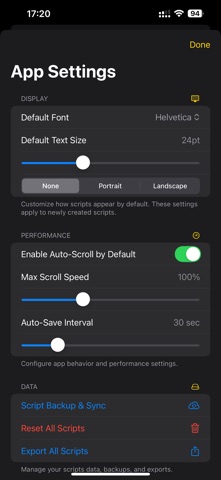
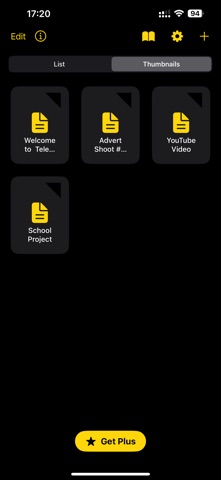
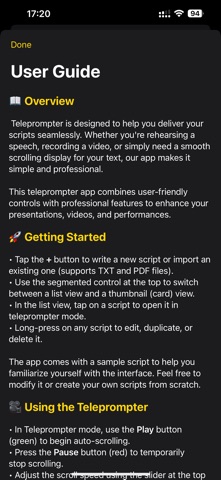
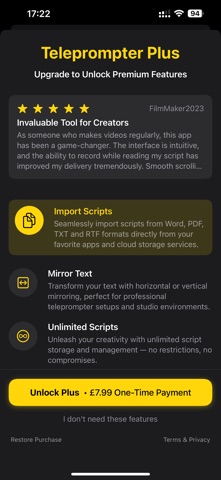
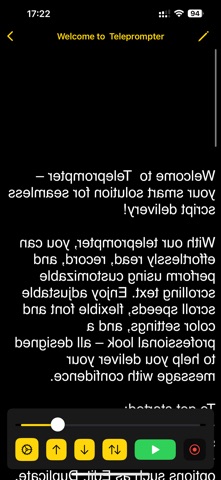
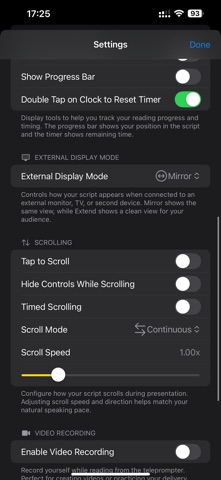
Transform your presentations with AI Teleprompter – the ultimate tool for content creators, speakers, and professionals who demand flawless delivery. **AI-POWERED SCRIPT CREATION** Never struggle with writer's block again. Our integrated AI assistant generates professional scripts from simple prompts and improves existing content with one tap. Choose your tone, adjust the length, and let AI craft the perfect script for your needs. **PROFESSIONAL TELEPROMPTER** • Smooth, adjustable scrolling with precision speed control • Customizable fonts, sizes, and colors for optimal readability • Mirror text horizontally or vertically for professional rigs • External display support for multi-screen setups • Floating timer and progress tracking • Tap controls for pause, resume, and navigation **AI SCRIPT IMPROVEMENT** • Enhance clarity and engagement instantly • Expand or condense scripts while maintaining your message • Rewrite in different tones (professional, casual, enthusiastic, and more) • Get quick improvements directly in the editor • Custom instructions for tailored results **VIDEO RECORDING** Record yourself while reading with simultaneous video capture. Perfect for creating polished video content with confident delivery. **SMART SCRIPT MANAGEMENT** • Import scripts from PDF and TXT files • Organize unlimited scripts in list or thumbnail view • Duplicate and edit scripts with ease • Cloud-ready organization system **PERFECT FOR:** YouTube creators and video producers Public speakers and presenters Business professionals Podcasters and broadcasters Educators and trainers Actors practicing lines Anyone who needs to deliver scripted content confidently **CUSTOMIZATION OPTIONS** • Choose from multiple font styles • Adjust text size and margins • Custom background and text colors • Cue indicators for reading guidance • Hide controls while scrolling for distraction-free reading **PLUS FEATURES** Upgrade to unlock: • Unlimited scripts (free users get 3 scripts) • Import from PDF and text files • Video recording with preview • Text mirroring for teleprompter rigs • Priority AI processing Whether you're filming YouTube videos, delivering presentations, or recording podcasts, AI Teleprompter gives you the confidence and tools to deliver your message perfectly every time. Download now and experience the future of script delivery with AI-powered assistance! • Auto-renewing subscription with monthly or annual billing options • Payment charged to iTunes Account at confirmation of purchase • Subscription automatically renews unless auto-renew is turned off at least 24 hours before the end of the current period • Account will be charged for renewal within 24 hours prior to the end of the current period • Subscriptions may be managed by the user and auto-renewal may be turned off by going to Account Settings after purchase • Any unused portion of a free trial period, if offered, will be forfeited when the user purchases a subscription LEGAL Terms of Use: https://mattcowlin.com/policies/terms.html Privacy Policy: https://mattcowlin.com/policies/privacy.html