PC 용 Auto Reloader: Page Refresher
- 카테고리: Utilities
- 최근 업데이트: 2026-03-13
- 현재 버전: 2.0.4
- 파일 크기: 1.30 MB
- 개발자: Aryaman Sharda
- 호환성: 필요 Windows XP, Windows Vista, Windows 7, Windows 8, Windows 8.1 and Windows 10, Windows 11



PC에서 Auto Reloader: Page Refresher 용 호환 APK 다운로드
| 다운로드 | 개발자 | 평점 | 점수 | 현재 버전 | 성인 랭킹 |
|---|---|---|---|---|---|
| ↓ PC용 APK 다운로드 | Aryaman Sharda | 0 | 0 | 2.0.4 | 4+ |
에뮬레이터의 중요성은 컴퓨터에서 안드로이드 환경을 흉내 내고 안드로이드 폰을 구입하지 않고도 안드로이드 앱을 설치하고 실행하는 것을 매우 쉽게 만들어주는 것입니다. 누가 당신이 두 세계를 즐길 수 없다고 말합니까? 우선 아래에있는 에뮬레이터 앱을 다운로드 할 수 있습니다.
A. Nox App . OR
B. Bluestacks App .
Bluestacks는 매우 대중적이므로 개인적으로 "B"옵션을 사용하는 것이 좋습니다. 문제가 발생하면 Google 또는 Naver.com에서 좋은 해결책을 찾을 수 있습니다.
Bluestacks.exe 또는 Nox.exe를 성공적으로 다운로드 한 경우 컴퓨터의 다운로드 폴더 또는 다운로드 한 파일을 일반적으로 저장하는 곳으로 이동하십시오.
찾으면 클릭하여 응용 프로그램을 설치하십시오. PC에서 설치 프로세스를 시작해야합니다.
다음을 클릭하여 EULA 라이센스 계약에 동의하십시오.
응용 프로그램을 설치하려면 화면 지시문을 따르십시오.
위 사항을 올바르게 수행하면 소프트웨어가 성공적으로 설치됩니다.
이제 설치 한 에뮬레이터 애플리케이션을 열고 검색 창을 찾으십시오. 지금 입력하십시오. - Auto Reloader: Page Refresher 앱을 쉽게 볼 수 있습니다. 그것을 클릭하십시오. 응용 프로그램 창이 열리고 에뮬레이터 소프트웨어에 응용 프로그램이 표시됩니다. 설치 버튼을 누르면 응용 프로그램이 다운로드되기 시작합니다. 이제 우리는 모두 끝났습니다.
그런 다음 "모든 앱"아이콘이 표시됩니다.
클릭하면 설치된 모든 응용 프로그램이 포함 된 페이지로 이동합니다.
당신은 Auto Reloader: Page Refresher 상. 그것을 클릭하고 응용 프로그램 사용을 시작하십시오.
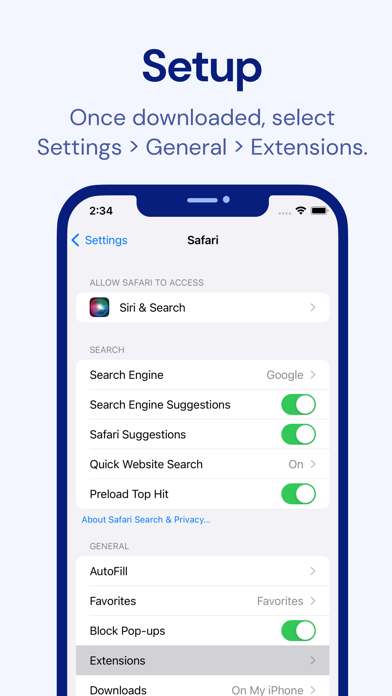
Tired of manually refreshing webpages in Safari? Auto Reloader refreshes any Safari tab automatically at the interval you choose so you always see the latest updates. Perfect for tracking auctions, ticket drops, sports scores, inventory updates, and anything else that changes frequently online. Instead of repeatedly tapping refresh, simply set the interval once and let Auto Reloader keep the page up to date. How It Works Auto Reloader takes less than a minute to set up. Install Auto Reloader Enable the extension in Safari settings Set a refresh interval for the tab you want to monitor Once enabled, the page refreshes automatically based on your selected interval so you always see the latest content without manually reloading the page. Common Scenarios Auto Reloader is useful anytime a webpage updates frequently and timing matters. • Online auctions and bidding pages • Ticket drops and event registrations • Sneaker and limited product releases • Live sports scores and match updates • Flash sales and inventory checks • Monitoring dashboards or status pages • Watching comment threads or live feeds If a page changes often, Auto Reloader helps you stay on top of updates automatically. Controls and Safety Auto Reloader gives you simple controls so you stay in charge. • Set refresh intervals individually for each tab • Pause or stop refreshing at any time • Battery saving mode pauses refreshing when unplugged • Lightweight extension that runs quietly in Safari The extension only refreshes pages according to the interval you select and can be stopped instantly whenever you want. Privacy Your browsing activity stays private. Auto Reloader requires no accounts and collects no personal data. The extension runs locally on your device and simply refreshes the page you choose. To use Auto Reloader you must enable the Safari extension in your device settings after installing the app. Simple. Fast. Private. Auto Reloader is designed to solve one problem cleanly. Automatic webpage refreshing in Safari without complicated setup or tracking. Download Auto Reloader today and stop refreshing webpages manually.