PC 용 사람 지우기 · 인물 지우기 - Removex
- 카테고리: Photo & Video
- 최근 업데이트: 2026-11-08
- 현재 버전: 64
- 파일 크기: 317.98 MB
- 개발자: Rosenburger Games
- 호환성: 필요 Windows XP, Windows Vista, Windows 7, Windows 8, Windows 8.1 and Windows 10, Windows 11




PC에서 사람 지우기 · 인물 지우기 - Removex 용 호환 APK 다운로드
| 다운로드 | 개발자 | 평점 | 점수 | 현재 버전 | 성인 랭킹 |
|---|---|---|---|---|---|
| ↓ PC용 APK 다운로드 | Rosenburger Games | 162 | 4.82716 | 64 | 4+ |
호환되는 PC 앱 또는 대안 확인
| 소프트웨어 | 다운로드 | 평점 | 개발자 |
|---|---|---|---|
| 사람 지우기 · 인물 지우기 |
PC 앱 받기 | 4.82716/5 162 리뷰 4.82716 |
Rosenburger Games |
에뮬레이터의 중요성은 컴퓨터에서 안드로이드 환경을 흉내 내고 안드로이드 폰을 구입하지 않고도 안드로이드 앱을 설치하고 실행하는 것을 매우 쉽게 만들어주는 것입니다. 누가 당신이 두 세계를 즐길 수 없다고 말합니까? 우선 아래에있는 에뮬레이터 앱을 다운로드 할 수 있습니다.
A. Nox App . OR
B. Bluestacks App .
Bluestacks는 매우 대중적이므로 개인적으로 "B"옵션을 사용하는 것이 좋습니다. 문제가 발생하면 Google 또는 Naver.com에서 좋은 해결책을 찾을 수 있습니다.
Bluestacks.exe 또는 Nox.exe를 성공적으로 다운로드 한 경우 컴퓨터의 다운로드 폴더 또는 다운로드 한 파일을 일반적으로 저장하는 곳으로 이동하십시오.
찾으면 클릭하여 응용 프로그램을 설치하십시오. PC에서 설치 프로세스를 시작해야합니다.
다음을 클릭하여 EULA 라이센스 계약에 동의하십시오.
응용 프로그램을 설치하려면 화면 지시문을 따르십시오.
위 사항을 올바르게 수행하면 소프트웨어가 성공적으로 설치됩니다.
이제 설치 한 에뮬레이터 애플리케이션을 열고 검색 창을 찾으십시오. 지금 입력하십시오. - 사람 지우기 · 인물 지우기 - Removex 앱을 쉽게 볼 수 있습니다. 그것을 클릭하십시오. 응용 프로그램 창이 열리고 에뮬레이터 소프트웨어에 응용 프로그램이 표시됩니다. 설치 버튼을 누르면 응용 프로그램이 다운로드되기 시작합니다. 이제 우리는 모두 끝났습니다.
그런 다음 "모든 앱"아이콘이 표시됩니다.
클릭하면 설치된 모든 응용 프로그램이 포함 된 페이지로 이동합니다.
당신은 사람 지우기 · 인물 지우기 - Removex 상. 그것을 클릭하고 응용 프로그램 사용을 시작하십시오.
Mac OS 에서 사람 지우기 · 인물 지우기 다운로드
| 다운로드 | 개발자 | 점수 | 현재 버전 | 성인 랭킹 |
|---|---|---|---|---|
| 무료 - Mac 에서 다운로드 | Rosenburger Games | 4.82716 |
64 | 4+ |
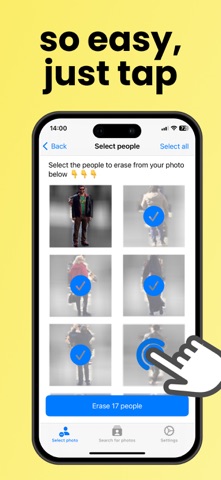
Remove people from photos on your iPhone. Key features: • Remove unwanted people (and objects too) • Use tapping to remove rather than drawing which is quicker and easier. • Uses the latest AI to accurately remove even the largest foreground subjects (e.g. an ex-partner) • Preserves original photo quality • Selectively remove some people while keeping others • Move people closer together to fill the gap left after removing someone — a unique way to keep group shots looking natural • Clean up vacation and group photos • Select all people to remove then choose who to exclude, making cleaning shots with lots of background people super easy. -------- Can Removex remove large objects or people in the foreground? Yes. Removex can accurately remove large subjects, including people standing close to the camera, while reconstructing the background naturally in full quality. How is Removex different from Apple Photos’ cleanup tool? Apple’s cleanup tool isn’t supported on many devices and often struggles with complex or large removals. Removex works on a wider range of phones and is designed to handle more difficult scenes with better consistency. It's also much easier to select lots of people to remove. How is it superior to AI chat models like ChatGPT for image editing? LLM-based editors regenerate the entire image, which can change faces, textures, and lighting. Removex edits only the selected area, preserving the original photo’s detail and realism. Why should I use Removex for removing people rather than a different app? Removex specialises in removing people and makes it super easy, we detect people first so you can just tap the people you want to remove without drawing (which is what most other apps make you do). We use more advanced AI than other apps for better results. Will Removex change the rest of my photo? No. Only the area you remove is modified, everything else remains exactly as captured. Can I use Removex for vacation photos? Absolutely. Removex is perfect for removing strangers, crowds, or distractions from travel photos. Can I use Removex for group photos? Yes. You can remove specific people from group shots without affecting others or distorting the scene. Can I remove someone standing right next to me, like a partner or friend? Yes. Removex is designed to handle close-contact situations and can remove someone beside you while keeping you intact and natural-looking. Can I remove multiple people or objects at once? Yes. You can remove multiple subjects in a single photo with just a few taps. Will my photo lose quality after editing? No. Removex preserves resolution and avoids the blurry or artificial look common in many AI-based editors. Is Removex free? Removex is free to download, and offers a free trial and even without the trial, the first erase is on us. Is my data private? Yes. Your photos are processed securely and are not used to train AI models. How do I get support? Email us: [email protected], a real person (me Ben) will respond to you within a day. Pro: • You can subscribe to unlock Pro, which gives you unlimited watermark free erasing. • Subscriptions auto-renew at the end of current period, unless cancelled 24-hours in advance prior to the end of the current period. The subscription fee is charged to your iTunes account at confirmation of purchase. You may manage your subscription and turn off auto-renewal by going to your Account Settings after purchase. Per Apple policy, no cancellation of the current subscription is allowed during active subscription period. Once purchased, refunds will not be provided for any unused portion of the term. App website: https://RemovexApp.com Terms of use: https://www.apple.com/legal/internet-services/itunes/dev/stdeula/ Privacy policy: https://bendoesapps.com/privacy