
PC 용 Vixel - AI Video Generator
- 카테고리: Photo & Video
- 최근 업데이트: 2026-07-30
- 현재 버전: 1.7.0
- 파일 크기: 113.86 MB
- 개발자: FENIX MOBILE YAZILIM A.S.
- 호환성: 필요 Windows XP, Windows Vista, Windows 7, Windows 8, Windows 8.1 and Windows 10, Windows 11





PC에서 Vixel - AI Video Generator 용 호환 APK 다운로드
| 다운로드 | 개발자 | 평점 | 점수 | 현재 버전 | 성인 랭킹 |
|---|---|---|---|---|---|
| ↓ PC용 APK 다운로드 | FENIX MOBILE YAZILIM A.S. | 8 | 4 | 1.7.0 | 4+ |
에뮬레이터의 중요성은 컴퓨터에서 안드로이드 환경을 흉내 내고 안드로이드 폰을 구입하지 않고도 안드로이드 앱을 설치하고 실행하는 것을 매우 쉽게 만들어주는 것입니다. 누가 당신이 두 세계를 즐길 수 없다고 말합니까? 우선 아래에있는 에뮬레이터 앱을 다운로드 할 수 있습니다.
A. Nox App . OR
B. Bluestacks App .
Bluestacks는 매우 대중적이므로 개인적으로 "B"옵션을 사용하는 것이 좋습니다. 문제가 발생하면 Google 또는 Naver.com에서 좋은 해결책을 찾을 수 있습니다.
Bluestacks.exe 또는 Nox.exe를 성공적으로 다운로드 한 경우 컴퓨터의 다운로드 폴더 또는 다운로드 한 파일을 일반적으로 저장하는 곳으로 이동하십시오.
찾으면 클릭하여 응용 프로그램을 설치하십시오. PC에서 설치 프로세스를 시작해야합니다.
다음을 클릭하여 EULA 라이센스 계약에 동의하십시오.
응용 프로그램을 설치하려면 화면 지시문을 따르십시오.
위 사항을 올바르게 수행하면 소프트웨어가 성공적으로 설치됩니다.
이제 설치 한 에뮬레이터 애플리케이션을 열고 검색 창을 찾으십시오. 지금 입력하십시오. - Vixel - AI Video Generator 앱을 쉽게 볼 수 있습니다. 그것을 클릭하십시오. 응용 프로그램 창이 열리고 에뮬레이터 소프트웨어에 응용 프로그램이 표시됩니다. 설치 버튼을 누르면 응용 프로그램이 다운로드되기 시작합니다. 이제 우리는 모두 끝났습니다.
그런 다음 "모든 앱"아이콘이 표시됩니다.
클릭하면 설치된 모든 응용 프로그램이 포함 된 페이지로 이동합니다.
당신은 Vixel - AI Video Generator 상. 그것을 클릭하고 응용 프로그램 사용을 시작하십시오.
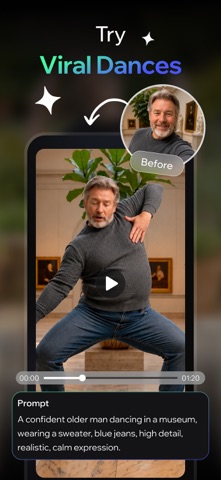
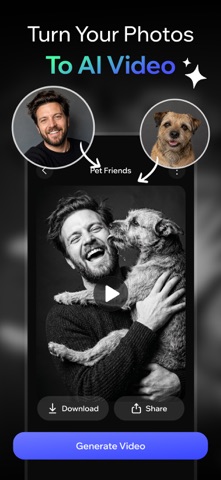
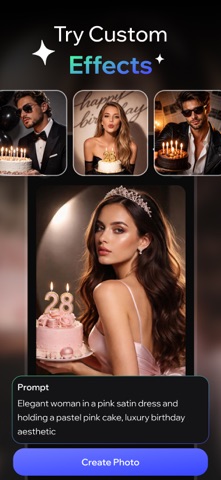
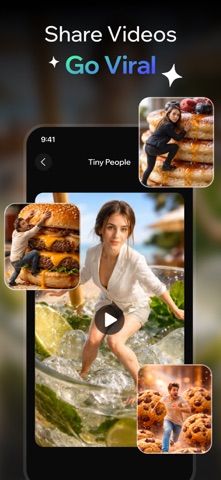
Vixel – AI Video Generator Create Stunning Videos with AI, Instantly Vixel is an intelligent all-in-one AI video generator that transforms text, images, and ideas into eye-catching animated videos. Built for speed and creativity, Vixel enables anyone to produce professional-quality videos without technical or design skills. Whether you’re creating short social media clips, cinematic visuals, educational content, or personal stories, Vixel gives you powerful AI tools combined with an easy, intuitive editing experience. Turn Ideas into Motion With Vixel, a simple prompt is enough to generate expressive, dynamic videos. Bring still photos to life, animate characters with realistic emotions, and design scenes that match your vision all in just a few taps. From storytelling to product promotion, Vixel helps you convert imagination into compelling visual content effortlessly. Powerful AI Video Creation Tools Vixel includes a complete suite of AI-powered features: • Text-to-video generation that converts scripts into animated scenes • Image-to-video technology that adds motion and emotion to photos • Photo-based video creation using your own images • Character animation with lifelike facial expressions and reactions • Rich media library with backgrounds, sound effects, and visual styles • Advanced visual effects powered by cutting-edge AI models • Creative filters, cinematic looks, viral effects, and immersive ASMR modes • Optimized HD exports for all devices and platforms Smart AI That Understands Your Story Vixel is powered by advanced AI generation models designed to understand context, emotion, and narrative flow. Simply describe your scene or write a short script, and Vixel creates animated visuals and characters that align with your intent. The result is expressive, high quality video content that feels natural and engaging. Made for Creators Everywhere Join a growing global community of creators, marketers, educators, influencers, and hobbyists who use Vixel every day. From TikTok and Instagram Reels to YouTube Shorts and personal videos, Vixel adapts to every content style and platform. Why Choose Vixel? • No animation or editing experience required • Create videos from text in minutes • Generate emotion-driven AI animations • Animate photos and illustrations effortlessly • Bring characters and action figures to life • Combine effects and styles for unique results • Save time while boosting creativity • Export high-quality videos ready to share anywhere One App, Endless Possibilities From text-to-video and photo-to-video creation to viral edits and cinematic shorts, Vixel is designed for speed, quality, and creative freedom. Whether you’re building reels, explainers, or artistic visuals, Vixel gives you the flexibility to create your way. Download Vixel – AI Video Generator today and explore: • AI video maker & smart video creator • Text-to-video & image-to-video generation • AI reel maker & short video creator • Creative filters, viral styles, and immersive edits • Transformations, visual illusions, and more SUBSCRIPTION INFORMATION: Payment will be charged to iTunes Account at confirmation of purchase. Subscription automatically renews unless auto-renew is turned off at least 24-hours before the end of the current period. The cost of the renewal depends on your subscription plan. Subscriptions may be managed and auto-renewal can be turned off in the user’s Account Settings. Any unused portion of a free trial period (if offered) will be forfeited when you purchase a premium subscription during the free trial period. Privacy Policy: https://www.fenixmobile.com/vixel/privacy-policy Terms of Use: https://www.fenixmobile.com/vixel/terms-of-use


