PC 용 Hands-Free Camera Timer
- 카테고리: Photo & Video
- 최근 업데이트: 2026-09-28
- 현재 버전: 2.1
- 파일 크기: 3.79 MB
- 개발자: Bahtiyar Polat
- 호환성: 필요 Windows XP, Windows Vista, Windows 7, Windows 8, Windows 8.1 and Windows 10, Windows 11



PC에서 Hands-Free Camera Timer 용 호환 APK 다운로드
| 다운로드 | 개발자 | 평점 | 점수 | 현재 버전 | 성인 랭킹 |
|---|---|---|---|---|---|
| ↓ PC용 APK 다운로드 | Bahtiyar Polat | 0 | 0 | 2.1 | 4+ |
에뮬레이터의 중요성은 컴퓨터에서 안드로이드 환경을 흉내 내고 안드로이드 폰을 구입하지 않고도 안드로이드 앱을 설치하고 실행하는 것을 매우 쉽게 만들어주는 것입니다. 누가 당신이 두 세계를 즐길 수 없다고 말합니까? 우선 아래에있는 에뮬레이터 앱을 다운로드 할 수 있습니다.
A. Nox App . OR
B. Bluestacks App .
Bluestacks는 매우 대중적이므로 개인적으로 "B"옵션을 사용하는 것이 좋습니다. 문제가 발생하면 Google 또는 Naver.com에서 좋은 해결책을 찾을 수 있습니다.
Bluestacks.exe 또는 Nox.exe를 성공적으로 다운로드 한 경우 컴퓨터의 다운로드 폴더 또는 다운로드 한 파일을 일반적으로 저장하는 곳으로 이동하십시오.
찾으면 클릭하여 응용 프로그램을 설치하십시오. PC에서 설치 프로세스를 시작해야합니다.
다음을 클릭하여 EULA 라이센스 계약에 동의하십시오.
응용 프로그램을 설치하려면 화면 지시문을 따르십시오.
위 사항을 올바르게 수행하면 소프트웨어가 성공적으로 설치됩니다.
이제 설치 한 에뮬레이터 애플리케이션을 열고 검색 창을 찾으십시오. 지금 입력하십시오. - Hands-Free Camera Timer 앱을 쉽게 볼 수 있습니다. 그것을 클릭하십시오. 응용 프로그램 창이 열리고 에뮬레이터 소프트웨어에 응용 프로그램이 표시됩니다. 설치 버튼을 누르면 응용 프로그램이 다운로드되기 시작합니다. 이제 우리는 모두 끝났습니다.
그런 다음 "모든 앱"아이콘이 표시됩니다.
클릭하면 설치된 모든 응용 프로그램이 포함 된 페이지로 이동합니다.
당신은 Hands-Free Camera Timer 상. 그것을 클릭하고 응용 프로그램 사용을 시작하십시오.
Mac OS 에서 Hands-Free Camera Timer 다운로드
| 다운로드 | 개발자 | 점수 | 현재 버전 | 성인 랭킹 |
|---|---|---|---|---|
| 무료 - Mac 에서 다운로드 | Bahtiyar Polat | 0 |
2.1 | 4+ |
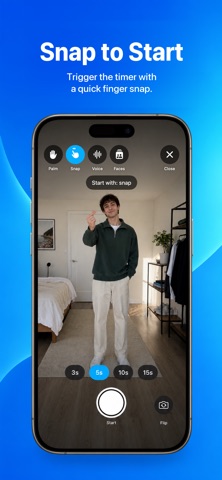
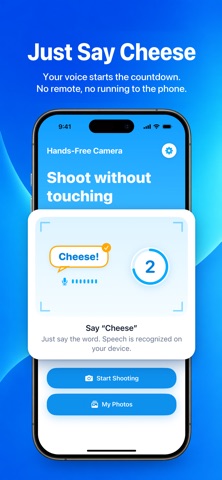
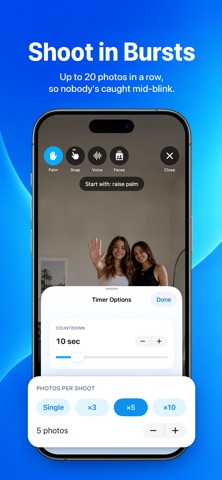
Take photos without touching your phone. Hands-Free lets you start the camera timer from across the room — no remote, no rushing back to your phone, no awkward reaching. Just set up your shot, step into frame, and start the countdown with a gesture, a snap or your voice. Four ways to start the timer: • Raise your hand — hold up an open palm and the countdown begins. • Snap your fingers — one quick snap is enough. • Say “Cheese” — or “Shoot”. Speech is recognized right on your device. • Wait for everyone — pick how many faces, and the countdown starts once they're all in the frame. Pick whichever feels most natural. You can turn each one on or off right from the camera screen. Why you'll love it: • Perfect for group photos where everyone wants to be in the shot. • Great for solo selfies and full-body pictures. • Countdown from 1 to 60 seconds, with a beep every second — heard even when your ringer is off. • With the back camera, the flash light blinks along with the countdown so everyone knows when to smile. • Take up to 20 photos per shoot — as a quick burst so nobody's caught mid-blink, or spaced up to a minute apart. • 0.5× wide angle on iPhones with an ultra-wide camera, so the whole group fits. • Front and back camera support, on iPhone and iPad. • Adjustable snap sensitivity to match your space. • Photos save straight to your library. Simple and private. Everything happens on your device. The camera is only on while the camera screen is open, and the microphone only listens when Snap or Voice is turned on. Audio is never recorded, and nothing is shared. Set it up once and never touch your screen mid-shot again. Download Hands-Free and capture the moment your way.