PC 용 Stop Motion Plus
- 카테고리: Photo & Video
- 최근 업데이트: 2025-07-21
- 현재 버전: 1.9
- 파일 크기: 24.22 MB
- 개발자: Nitrio
- 호환성: 필요 Windows XP, Windows Vista, Windows 7, Windows 8, Windows 8.1 and Windows 10, Windows 11



에뮬레이터의 중요성은 컴퓨터에서 안드로이드 환경을 흉내 내고 안드로이드 폰을 구입하지 않고도 안드로이드 앱을 설치하고 실행하는 것을 매우 쉽게 만들어주는 것입니다. 누가 당신이 두 세계를 즐길 수 없다고 말합니까? 우선 아래에있는 에뮬레이터 앱을 다운로드 할 수 있습니다.
A. Nox App . OR
B. Bluestacks App .
Bluestacks는 매우 대중적이므로 개인적으로 "B"옵션을 사용하는 것이 좋습니다. 문제가 발생하면 Google 또는 Naver.com에서 좋은 해결책을 찾을 수 있습니다.
Bluestacks.exe 또는 Nox.exe를 성공적으로 다운로드 한 경우 컴퓨터의 다운로드 폴더 또는 다운로드 한 파일을 일반적으로 저장하는 곳으로 이동하십시오.
찾으면 클릭하여 응용 프로그램을 설치하십시오. PC에서 설치 프로세스를 시작해야합니다.
다음을 클릭하여 EULA 라이센스 계약에 동의하십시오.
응용 프로그램을 설치하려면 화면 지시문을 따르십시오.
위 사항을 올바르게 수행하면 소프트웨어가 성공적으로 설치됩니다.
이제 설치 한 에뮬레이터 애플리케이션을 열고 검색 창을 찾으십시오. 지금 입력하십시오. - Stop Motion Plus 앱을 쉽게 볼 수 있습니다. 그것을 클릭하십시오. 응용 프로그램 창이 열리고 에뮬레이터 소프트웨어에 응용 프로그램이 표시됩니다. 설치 버튼을 누르면 응용 프로그램이 다운로드되기 시작합니다. 이제 우리는 모두 끝났습니다.
그런 다음 "모든 앱"아이콘이 표시됩니다.
클릭하면 설치된 모든 응용 프로그램이 포함 된 페이지로 이동합니다.
당신은 Stop Motion Plus 상. 그것을 클릭하고 응용 프로그램 사용을 시작하십시오.
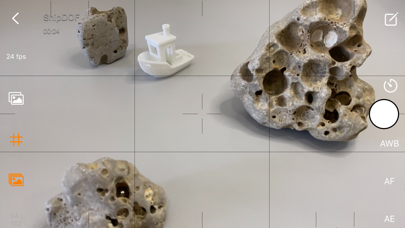
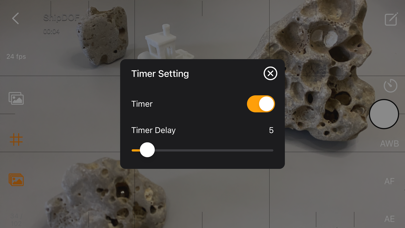
Stop Motion for iOS Simple and robust stop motion app. Create amazing stop-motion videos with ease. Perfect for casual users with an easy-to-use control panel. Project Management: • Rename, delete project, or export movie option via long press. • Projects are copyable to other devices using the Files app. Go to Stop Motion and copy the project folder. Stop Motion Plus Camera Features: • Default highest photo quality output depending on device. • Support for dual-lens or triple-lens devices. • Auto/Lock White Balance. • Auto/Touch Focus/Exposure control. • Timer for interval capture ranging from 1–60 seconds. • Show/Hide grid option. • Option to show onion/overlay of previous frames for reference — up to 3 overlay frames. • Opacity adjustment for onion/overlay frames. • Capture background reference to support object removal. • Photos are saved immediately to prevent accidental data loss. • Photos are saved to internal storage and available for external editing (access files via iTunes or Files app). • Support for voice control to capture images. • Simple UI and easy to use. Stop Motion Plus Edit Panel Features: • Set movie frame rate (FPS) from 1–60 fps. • Edit images by removing supporting structures using background reference. • Add sound to project — sounds are placed in Files app > Stop Motion > [Project Name] > Audio folder. • Preview stop motion animation. • Switch between Camera Panel and Edit Panel. • Select a frame in Edit Panel, switch back to Camera Panel, and new capture will be inserted after the selected frame. • Long press frame thumbnail to access Copy/Paste/Delete frame options. • Add freeze-frame duration for delay/pause effect. • Copy All Frames / Paste Frames / Paste Inverted Frames. • Copy Selected Frames / Paste Frames / Paste Inverted Frames. • Movie info available for better understanding of video length. Render Panel: • Video name matches the project title (e.g., Ship.mp4). • Set video resolution: HD, Full HD, or 4K. • Set video aspect ratio: 16:9, 4:3, or 1:1. • Render output as animated GIF or APNG. • Size options for GIF/APNG: 1280x720, 640x360, or 320x180. • Videos and animated GIFs are saved to the camera roll. • Animated APNGs are saved into the project folder. Quick Start Guide: 1. Tap on the Create button and enter a name. 2. Tap on the project name to load it. 3. Position your camera and start capturing. 4. After finishing, go to the Edit Panel. 5. Set your desired FPS and preview your animation. 6. Hit Render and your video will be saved to the camera roll. 2 Types of Background Reference: • Global Reference – for static backgrounds; uses a single background image. • Current Reference – for dynamic backgrounds; captures individual background images for each frame. Tips: • Use the overlay image feature to help position objects precisely. • Use the grid for better object alignment. • Start your project in a well-lit environment. Ideally, use a dedicated light source. • Use voice control to capture frames if your hands are occupied. • Create your project in multiple scenes and use iMovie for advanced video editing. What is Stop Motion? Stop motion is an animated filmmaking technique in which objects are physically manipulated in small increments between individually photographed frames. When played in sequence, the objects appear to move independently. Dolls with movable joints or clay figures are often used because they are easy to reposition. Stop-motion animation using plasticine is called clay animation or claymation. However, stop motion isn't limited to figures or models. It can also involve humans, household items, or everyday objects—often used for comedic or creative effects. Sequential drawings can also be used, similar to traditional animation, like a flipbook. When stop motion involves human actors, it's referred to as pixilation or pixillated animation. Thanks for your support! Visit nitrio.com for more apps for your iOS devices.