PC 용 Lease Locator Oilfield LSD NTS
- 카테고리: Business
- 최근 업데이트: 2026-10-27
- 현재 버전: 6.7.0
- 파일 크기: 18.10 MB
- 개발자: Wolf Mask
- 호환성: 필요 Windows XP, Windows Vista, Windows 7, Windows 8, Windows 8.1 and Windows 10, Windows 11


PC에서 Lease Locator Oilfield LSD NTS 용 호환 APK 다운로드
| 다운로드 | 개발자 | 평점 | 점수 | 현재 버전 | 성인 랭킹 |
|---|---|---|---|---|---|
| ↓ PC용 APK 다운로드 | Wolf Mask | 0 | 0 | 6.7.0 | 4+ |
에뮬레이터의 중요성은 컴퓨터에서 안드로이드 환경을 흉내 내고 안드로이드 폰을 구입하지 않고도 안드로이드 앱을 설치하고 실행하는 것을 매우 쉽게 만들어주는 것입니다. 누가 당신이 두 세계를 즐길 수 없다고 말합니까? 우선 아래에있는 에뮬레이터 앱을 다운로드 할 수 있습니다.
A. Nox App . OR
B. Bluestacks App .
Bluestacks는 매우 대중적이므로 개인적으로 "B"옵션을 사용하는 것이 좋습니다. 문제가 발생하면 Google 또는 Naver.com에서 좋은 해결책을 찾을 수 있습니다.
Bluestacks.exe 또는 Nox.exe를 성공적으로 다운로드 한 경우 컴퓨터의 다운로드 폴더 또는 다운로드 한 파일을 일반적으로 저장하는 곳으로 이동하십시오.
찾으면 클릭하여 응용 프로그램을 설치하십시오. PC에서 설치 프로세스를 시작해야합니다.
다음을 클릭하여 EULA 라이센스 계약에 동의하십시오.
응용 프로그램을 설치하려면 화면 지시문을 따르십시오.
위 사항을 올바르게 수행하면 소프트웨어가 성공적으로 설치됩니다.
이제 설치 한 에뮬레이터 애플리케이션을 열고 검색 창을 찾으십시오. 지금 입력하십시오. - Lease Locator Oilfield LSD NTS 앱을 쉽게 볼 수 있습니다. 그것을 클릭하십시오. 응용 프로그램 창이 열리고 에뮬레이터 소프트웨어에 응용 프로그램이 표시됩니다. 설치 버튼을 누르면 응용 프로그램이 다운로드되기 시작합니다. 이제 우리는 모두 끝났습니다.
그런 다음 "모든 앱"아이콘이 표시됩니다.
클릭하면 설치된 모든 응용 프로그램이 포함 된 페이지로 이동합니다.
당신은 Lease Locator Oilfield LSD NTS 상. 그것을 클릭하고 응용 프로그램 사용을 시작하십시오.
Mac OS 에서 Lease Locator Oilfield LSD NTS 다운로드
| 다운로드 | 개발자 | 점수 | 현재 버전 | 성인 랭킹 |
|---|---|---|---|---|
| 무료 - Mac 에서 다운로드 | Wolf Mask | 0 |
6.7.0 | 4+ |
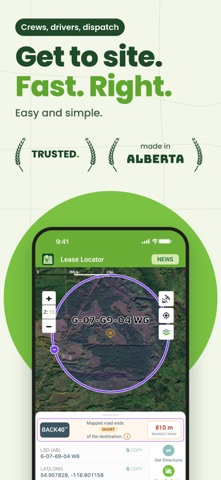
Lease Locator - Get's you there! The lease road GPS for Alberta, BC, Saskatchewan and Manitoba. Type the location off your work order, see the pin on the map, and drive straight there. Free to start. GET TO SITE. FAST. RIGHT. • Ticket says 6-07-69-04 W6? Type it in and get a pin on the map • The map shows the location as soon as you enter it • Get driving directions in Apple Maps or Google Maps KNOW BEFORE YOU DRIVE • BACK40™ (Pro) tells you if the mapped road runs right to the site, stops short, or ends blind • See how far the lease is from the nearest road before you leave ANY LEASE. EVERY PROVINCE. • LSD (Alberta, Saskatchewan, Manitoba) and NTS (BC) • UTM and Lat/Long SEE WHERE YOU'VE BEEN • History remembers every location you look up • Quickly find a site you have been to before TRUSTED IN THE FIELD • Built in Alberta (Calgary) • Used by hotshot and transport drivers, lease operators, service crews, and the dispatchers and fleet managers who send them out NO SIGNAL. NO PROBLEM. • 18.7 million LSDs stored on your phone, so lookups work with no service (Pro) • Turn on offline before you leave service and keep searching at site SAVE SITES. SHARE THEM WITH YOUR CREW. • Folders with notes, gate codes and radio channels • Share a folder so the whole crew has the same locations • Unlimited folders with Pro ALSO IN THE APP • Daily rig activity on the map • Colour-coded pins for your saved sites PLANS Free to start, with a limited number of searches each month. Basic removes the search limit. Pro adds offline, unlimited folders and BACK40™. Questions? Phone or text (587) 327-0104. Privacy Policy: https://www.tussock.ca/privacy Terms of Use: https://www.tussock.ca/terms