PC 용 Photomator
- 카테고리: Photo & Video
- 최근 업데이트: 2026-08-27
- 현재 버전: 3.4.15
- 파일 크기: 177.72 MB
- 개발자: Pixelmator Team
- 호환성: 필요 Windows XP, Windows Vista, Windows 7, Windows 8, Windows 8.1 and Windows 10, Windows 11




PC에서 Photomator 용 호환 APK 다운로드
| 다운로드 | 개발자 | 평점 | 점수 | 현재 버전 | 성인 랭킹 |
|---|---|---|---|---|---|
| ↓ PC용 APK 다운로드 | Pixelmator Team | 315 | 4.60317 | 3.4.15 | 4+ |
에뮬레이터의 중요성은 컴퓨터에서 안드로이드 환경을 흉내 내고 안드로이드 폰을 구입하지 않고도 안드로이드 앱을 설치하고 실행하는 것을 매우 쉽게 만들어주는 것입니다. 누가 당신이 두 세계를 즐길 수 없다고 말합니까? 우선 아래에있는 에뮬레이터 앱을 다운로드 할 수 있습니다.
A. Nox App . OR
B. Bluestacks App .
Bluestacks는 매우 대중적이므로 개인적으로 "B"옵션을 사용하는 것이 좋습니다. 문제가 발생하면 Google 또는 Naver.com에서 좋은 해결책을 찾을 수 있습니다.
Bluestacks.exe 또는 Nox.exe를 성공적으로 다운로드 한 경우 컴퓨터의 다운로드 폴더 또는 다운로드 한 파일을 일반적으로 저장하는 곳으로 이동하십시오.
찾으면 클릭하여 응용 프로그램을 설치하십시오. PC에서 설치 프로세스를 시작해야합니다.
다음을 클릭하여 EULA 라이센스 계약에 동의하십시오.
응용 프로그램을 설치하려면 화면 지시문을 따르십시오.
위 사항을 올바르게 수행하면 소프트웨어가 성공적으로 설치됩니다.
이제 설치 한 에뮬레이터 애플리케이션을 열고 검색 창을 찾으십시오. 지금 입력하십시오. - Photomator 앱을 쉽게 볼 수 있습니다. 그것을 클릭하십시오. 응용 프로그램 창이 열리고 에뮬레이터 소프트웨어에 응용 프로그램이 표시됩니다. 설치 버튼을 누르면 응용 프로그램이 다운로드되기 시작합니다. 이제 우리는 모두 끝났습니다.
그런 다음 "모든 앱"아이콘이 표시됩니다.
클릭하면 설치된 모든 응용 프로그램이 포함 된 페이지로 이동합니다.
당신은 Photomator 상. 그것을 클릭하고 응용 프로그램 사용을 시작하십시오.
Mac OS 에서 Photomator 다운로드
| 다운로드 | 개발자 | 점수 | 현재 버전 | 성인 랭킹 |
|---|---|---|---|---|
| ₩5,900 - Mac 에서 다운로드 | Pixelmator Team | 4.60317 |
3.4.15 | 4+ |
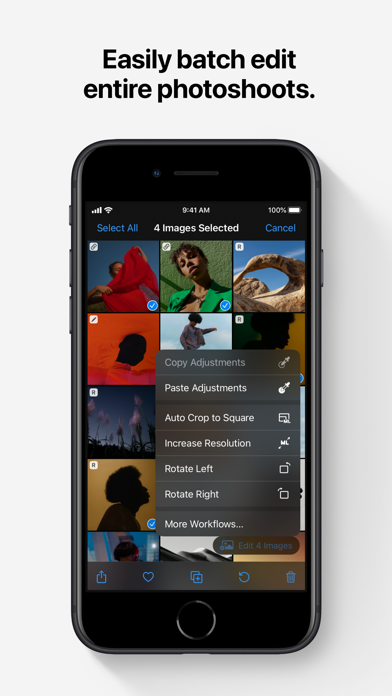
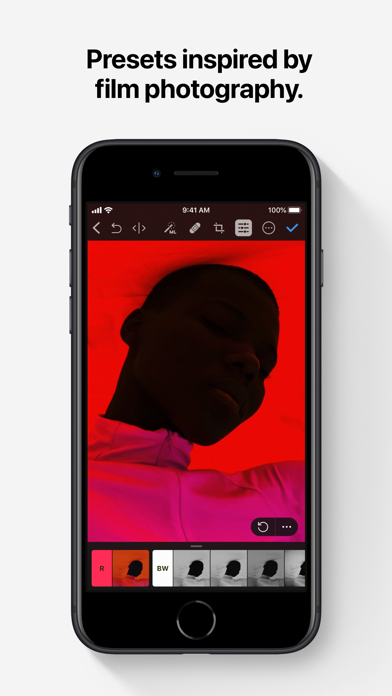
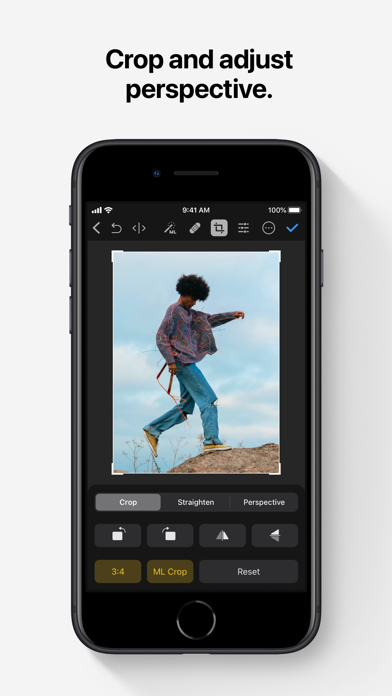
Photomator is the most powerful photo editing app ever designed for a mobile device. It includes an extensive collection of cutting-edge color adjustments, automatic selections powered by AI, support for over 750 RAW image formats, a magical Repair tool for removing unwanted objects, and many more powerful features, letting you enjoy pro photo editing anyplace, anytime. Everything you need to make your photos look incredible • Edit photos using a wide collection of powerful, nondestructive color adjustments • Quickly make precise subject, sky, and background selections in photos using AI, add gradient masks, and easily make selections using a brush • Effortlessly remove unwanted objects using an incredible object removal tool • Crop, straighten, rotate, and adjust the perspective of photos with an easy-to-use Crop tool • Instantly increase the resolution of photos using AI • Remove camera noise and image compression artifacts with the powerful Denoise feature • Magically remove color banding and increase color depth in photos with the AI-powered Smart Deband feature • Make your photos stand out with photographer-designed presets for landscape, black and white, and other photography styles • Easily copy and paste edits between photos or batch edit even hundreds of photographs at a time • Open and edit over 750 RAW image formats, including Apple ProRAW and compressed Fujifilm RAWs • Follow all the changes you make in the beautiful live histogram Tools powered by AI • Select the subject, sky, or background in a photo with just a tap • Improve the quality of photos by reducing camera noise with the AI-powered Denoise feature, intelligently upscale photos with Super Resolution, or magically remove color banding and increase color depth using Smart Deband • Automatically enhance shots using a machine learning algorithm trained on 20 million pro photos, or fine-tune individual adjustments, like White Balance, Selective Color, or Color Balance with a single tap • Intelligently crop photos using the AI-powered auto-cropping • Copy the look of any photo to another using the incredible Match Colors feature State-of-the-art color adjustments • Enjoy powerful tools for effortlessly adjusting the temperature, tint, exposure, contrast, brightness, hue, saturation, and vibrance in your photos • Recover incredible amounts of detail in the highlights and shadows of photos • Magically enhance fine details and structure in photos using powerful Clarity and Texture adjustments, or adjust textures in the highlights, midtones, and shadows separately • Selectively edit individual color ranges with Selective Color, or improve the balance of colors in the shadows, midtones, and highlights with Color Balance • Adjust lighting and colors with full precision using Levels and Curves adjustments • Mix the balance of the red, green, and blue color channels to create intense color effects in your images • Replace any color with any other using the Replace Color adjustment • Create beautiful black and whites even from your color photos • Use a range of additional adjustments, like Sharpen, Fade, Grain, Color Monochrome, Sepia, and Invert to make your photos stand out • Instantly change the look of photos with LUTs or export custom LUTs to use in other apps Compatibility • Automatically sync every change back to your Photos or Files browser • With the support for iCloud Drive, enjoy seamless edit syncing across Mac, iPhone, and iPad • Photomator is built from the ground up for iPhone and iPad with a native design that blends seamlessly with the sleek and modern look of iOS and iPadOS 18 • Photomator uses powerful Apple technologies like Metal, Core ML, and Core Image to deliver staggeringly fast performance, even when editing large RAW photos or batch editing multiple images at a time • Privacy policy: https://www.apple.com/legal/privacy/en-ww/