
PC 용 AccuRaw Monochrome
- 카테고리: Photo & Video
- 최근 업데이트: 2026-06-05
- 현재 버전: 3.3.2
- 파일 크기: 6.85 MB
- 개발자: Alexander McGuffog
- 호환성: 필요 Windows XP, Windows Vista, Windows 7, Windows 8, Windows 8.1 and Windows 10, Windows 11

PC에서 AccuRaw Monochrome 용 호환 APK 다운로드
| 다운로드 | 개발자 | 평점 | 점수 | 현재 버전 | 성인 랭킹 |
|---|---|---|---|---|---|
| ↓ PC용 APK 다운로드 | Alexander McGuffog | 0 | 0 | 3.3.2 | 4+ |
에뮬레이터의 중요성은 컴퓨터에서 안드로이드 환경을 흉내 내고 안드로이드 폰을 구입하지 않고도 안드로이드 앱을 설치하고 실행하는 것을 매우 쉽게 만들어주는 것입니다. 누가 당신이 두 세계를 즐길 수 없다고 말합니까? 우선 아래에있는 에뮬레이터 앱을 다운로드 할 수 있습니다.
A. Nox App . OR
B. Bluestacks App .
Bluestacks는 매우 대중적이므로 개인적으로 "B"옵션을 사용하는 것이 좋습니다. 문제가 발생하면 Google 또는 Naver.com에서 좋은 해결책을 찾을 수 있습니다.
Bluestacks.exe 또는 Nox.exe를 성공적으로 다운로드 한 경우 컴퓨터의 다운로드 폴더 또는 다운로드 한 파일을 일반적으로 저장하는 곳으로 이동하십시오.
찾으면 클릭하여 응용 프로그램을 설치하십시오. PC에서 설치 프로세스를 시작해야합니다.
다음을 클릭하여 EULA 라이센스 계약에 동의하십시오.
응용 프로그램을 설치하려면 화면 지시문을 따르십시오.
위 사항을 올바르게 수행하면 소프트웨어가 성공적으로 설치됩니다.
이제 설치 한 에뮬레이터 애플리케이션을 열고 검색 창을 찾으십시오. 지금 입력하십시오. - AccuRaw Monochrome 앱을 쉽게 볼 수 있습니다. 그것을 클릭하십시오. 응용 프로그램 창이 열리고 에뮬레이터 소프트웨어에 응용 프로그램이 표시됩니다. 설치 버튼을 누르면 응용 프로그램이 다운로드되기 시작합니다. 이제 우리는 모두 끝났습니다.
그런 다음 "모든 앱"아이콘이 표시됩니다.
클릭하면 설치된 모든 응용 프로그램이 포함 된 페이지로 이동합니다.
당신은 AccuRaw Monochrome 상. 그것을 클릭하고 응용 프로그램 사용을 시작하십시오.
Mac OS 에서 AccuRaw Monochrome 다운로드
| 다운로드 | 개발자 | 점수 | 현재 버전 | 성인 랭킹 |
|---|---|---|---|---|
| ₩159,000 - Mac 에서 다운로드 | Alexander McGuffog | 0 |
3.3.2 | 4+ |
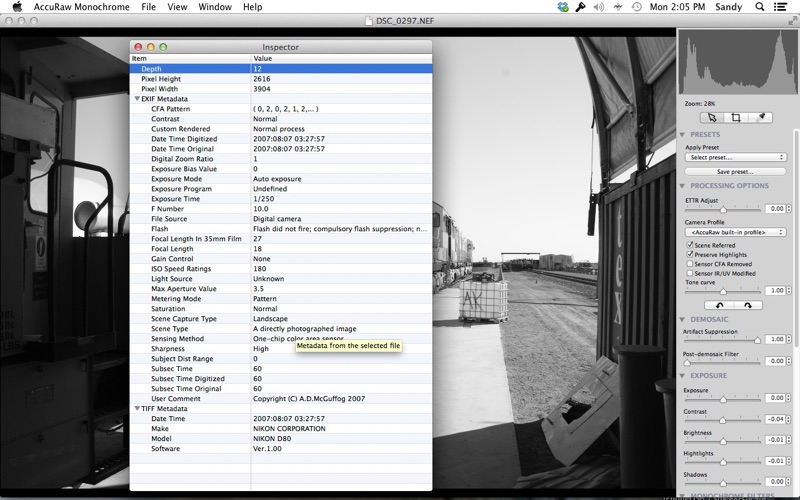
• Native Apple Silicon support for blistering speed on new-generation Apple Macs • Dark mode support • EXR output • Completely linear floating point image processing • Raw image conversion optimized to maximize resolution • Demosaicing algorithm and image adjustments specifically tailored for monochrome • Touch Bar support • macOS Tahoe and Retina 5K display compatible AccuRaw Monochrome is a raw image editor and developer specifically for creating monochrome images. Raw file formats from most camera manufacturers are supported, for example Nikon NEF files, Canon CR2 files, Leica DNG files, etc. AccuRaw also provides state-of-the-art processing for Fuji X-Trans based cameras. A full list of supported cameras is on the product web site. AccuRaw Features • Optimized for creating monochrome images; AccuRaw Monochrome's custom demosaicing algorithm delivers better tonality and better artifact control that conventional color algorithms. • Optimized to maximize image resolution. • In addition to conventional cameras, AccuRaw Monochrome also provides for modified cameras, e.g., cameras modified for IR or UV operation, or by the removal of the sensor's Bayer array. • Non-clipping workflow - Accuraw EXR has a highly linear floating point processing engine that treats EXR as a first-class citizen. You can easily recover even heavily blown highlights in downstream processing apps. • Fits with your workflow. AccuRaw doesn't try to take over your workflow. It just fits in. There are no catalogs to worry about; your files stay right where they are, and AccuRaw never touches them. AccuRaw just automatically remembers your edits. A powerful system of presets and batch processing make work efficient, and you can output to any of JPEG, TIFF or DNG for maximum compatibility with your choice of post processing and digital asset management tools. • Integration with apps such as Lightroom, Photoshop and Aperture ** Note: (a) AccuRaw monochrome only converts to monochrome, and (b) AccuRaw Monochrome doesn't do noise reduction or lens corrections - the image you get is the image your camera saw. System Requirements: Raw conversion requires very substantial amounts of processing power and memory. While AccuRaw Monochrome will run on laptops, performance is optimized for desktop systems. We strongly recommend the following minimum system specifications: • OS X 10.9 (Lion) or later • 4 GB system memory minimum, 8GB recommended • 128 MB graphics memory minimum, 512 MB graphics memory recommended