PC 용 DroneXR - FPV for DJI drones
- 카테고리: Photo & Video
- 최근 업데이트: 2026-10-22
- 현재 버전: 2.3
- 파일 크기: 121.58 MB
- 개발자: Appologics UG (haftungsbeschrankt)
- 호환성: 필요 Windows XP, Windows Vista, Windows 7, Windows 8, Windows 8.1 and Windows 10, Windows 11




PC에서 DroneXR - FPV for DJI drones 용 호환 APK 다운로드
| 다운로드 | 개발자 | 평점 | 점수 | 현재 버전 | 성인 랭킹 |
|---|---|---|---|---|---|
| ↓ PC용 APK 다운로드 | Appologics UG (haftungsbeschrankt) | 2 | 5 | 2.3 | 4+ |
에뮬레이터의 중요성은 컴퓨터에서 안드로이드 환경을 흉내 내고 안드로이드 폰을 구입하지 않고도 안드로이드 앱을 설치하고 실행하는 것을 매우 쉽게 만들어주는 것입니다. 누가 당신이 두 세계를 즐길 수 없다고 말합니까? 우선 아래에있는 에뮬레이터 앱을 다운로드 할 수 있습니다.
A. Nox App . OR
B. Bluestacks App .
Bluestacks는 매우 대중적이므로 개인적으로 "B"옵션을 사용하는 것이 좋습니다. 문제가 발생하면 Google 또는 Naver.com에서 좋은 해결책을 찾을 수 있습니다.
Bluestacks.exe 또는 Nox.exe를 성공적으로 다운로드 한 경우 컴퓨터의 다운로드 폴더 또는 다운로드 한 파일을 일반적으로 저장하는 곳으로 이동하십시오.
찾으면 클릭하여 응용 프로그램을 설치하십시오. PC에서 설치 프로세스를 시작해야합니다.
다음을 클릭하여 EULA 라이센스 계약에 동의하십시오.
응용 프로그램을 설치하려면 화면 지시문을 따르십시오.
위 사항을 올바르게 수행하면 소프트웨어가 성공적으로 설치됩니다.
이제 설치 한 에뮬레이터 애플리케이션을 열고 검색 창을 찾으십시오. 지금 입력하십시오. - DroneXR - FPV for DJI drones 앱을 쉽게 볼 수 있습니다. 그것을 클릭하십시오. 응용 프로그램 창이 열리고 에뮬레이터 소프트웨어에 응용 프로그램이 표시됩니다. 설치 버튼을 누르면 응용 프로그램이 다운로드되기 시작합니다. 이제 우리는 모두 끝났습니다.
그런 다음 "모든 앱"아이콘이 표시됩니다.
클릭하면 설치된 모든 응용 프로그램이 포함 된 페이지로 이동합니다.
당신은 DroneXR - FPV for DJI drones 상. 그것을 클릭하고 응용 프로그램 사용을 시작하십시오.
Mac OS 에서 DroneXR 다운로드
| 다운로드 | 개발자 | 점수 | 현재 버전 | 성인 랭킹 |
|---|---|---|---|---|
| 무료 - Mac 에서 다운로드 | Appologics UG (haftungsbeschrankt) | 5 |
2.3 | 4+ |
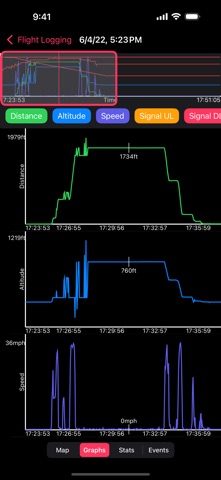
With DroneXR (former DroneVR ;-) you can take a seat in your drone and fly like a bird. DroneXR connects your phone with the drone and renders the live video stream in stereo with high-quality lens distortion correction, so that it can be viewed with a virtual reality headset. Important: The free version of DroneXR supports the Ryze Tello drone. Support for DJI drones can be activated via in-app purchase. See below for a list of supported drones. DroneXR's features: ============== * Beautiful, configurable user interface supporting dark and light mode. * Two different head-up displays to overlay telemetry data such as heading, speed and altitude onto the camera view in real time. * Comprehensive head-up menu to control all drone and camera settings while flying. * Phone camera view and mini-map to see what's happening around you and stay oriented. * Head tracking to control the orientation of the drone camera by moving your head! With the DJI Mavic/Phantom/Spark series, head tracking controls the camera pitch. With the DJI Inspire 1/Mavic 2/Mavic Air 2, head tracking works across all three axes. * Detailed flight logging of flight path, telemetry data and events. Flight logs can be synchronized with your Mac via iCloud or file sharing. * Spectator mode to link multiple phones and fly together with friends. * Mono or stereo rendering of the drone video. Stereo rendering uses advanced lens distortion correction for high image quality. * Highly adjustable to different VR headsets. * High-definition video: 720p at 30 frames per second with Spark/Phantom 3/Phantom 4/Inspire 1, and up to 1080p with Mavic Pro/Mavic 2. * Voice control for hands-free operation. * Supported drones: Ryze Tello (free); via in-app purchase: Mavic Pro, Mavic 2 Pro/Zoom, DJI Mini/Mini 2/Mini SE, Mavic Air/Air 2/Air 2S, Spark, Phantom 4/4 Pro/4 Advanced, Phantom 3 Professional/Advanced/Standard/4K, Inspire 1. Important notes: ============ * To use DroneXR you need one of the drones listed above. * To control the Ryze Tello drone you need to connect a gamepad to your phone. * To use DroneXR in stereo mode you need a virtual reality headset that holds your iPhone (e.g. Homido, FreeFly VR, Zeiss VR One, Cardboard). A high-resolution iPhone with a screen size of at least 5.5 inches is recommended. More information about recommended headsets can be found on our website: https://dronexr.de